
HP ProLiant ML570 Generation 2 Server Setup and Installation Guide



Installing Hardware Options
HP ProLiant ML570 Generation 2 Server Setup and Installation Guide 3-55
HP CONFIDENTIAL
Writer: Wendy Wing File Name: d-ch3 Installing Hardware Options.doc
Codename: Time Bandit Part Number: 223960-002 Last Saved On: 8/22/02 10:51 AM
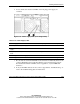
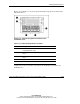
Figure 3-47 and Table 3-13 show the optional internal storage device locations in the
rack-model server.
Figure 3-47: Internal storage device locations in the
rack-model server
Table 3-13: Internal Storage Device Locations
Item Storage Device
1–2 * Optional DVD drive, CD-ROM drive, tape drive, or two-bay
hot-plug SCSI drive cage
3 Drive cage A for hot-plug hard drives and universal tape
drives
4 Drive cage B for hot-plug hard drives and universal tape
drives
5 CD-ROM drive or optional DVD drive
* The removable media bays do not support non-hot-plug hard drives.
A label on the front of each drive cage indicates the numbering of each drive slot,
SCSI IDs 0 to 5.