
HP ProLiant ML570 Generation 2 Server Setup and Installation Guide



Installing Hardware Options
HP ProLiant ML570 Generation 2 Server Setup and Installation Guide 3-53
HP CONFIDENTIAL
Writer: Wendy Wing File Name: d-ch3 Installing Hardware Options.doc
Codename: Time Bandit Part Number: 223960-002 Last Saved On: 8/22/02 10:51 AM
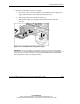
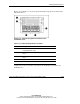
6. Locate and be sure that the rear LEDs on the hot-plug power supply are
activated.
Figure 3-46: Power supply LEDs (rack configuration)
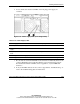
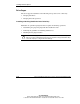
Table 3-12: Power Supply LEDs
Power Supply Condition 1: Power LED (Green) 2: Fault LED (Amber)
No AC power to any power supply Off Off
No AC power to a particular power
supply
Off On
AC power present; system in standby
mode
Blinking Off
Power supply on and working properly On Off
Power supply current limit exceeded On Blinking
7. Be sure that the external health LED on the front Power On/Standby button of the
system is illuminated green, indicating that the system is functioning properly.
For detailed information on LEDs, refer to Appendix C, “System LEDs and
Switches.”
8. If any of the LEDs indicates an error, refer to Appendix D, “Troubleshooting,” or
refer to the troubleshooting guide for instructions.