
HP ProLiant ML570 Generation 2 Server Setup and Installation Guide



Installing Hardware Options
3-48 HP ProLiant ML570 Generation 2 Server Setup and Installation Guide
HP CONFIDENTIAL
Writer: Wendy Wing File Name: d-ch3 Installing Hardware Options.doc
Codename: Time Bandit Part Number: 223960-002 Last Saved On: 8/22/02 10:51 AM
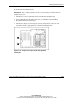
8. Configure the external cabling. Refer to the Remote Insight Lights-Out
Installation and User Guide on the Documentation CD that ships with the server
or refer to Chapter 7, “Cabling the Server.”
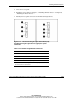
IMPORTANT: Once the Remote Insight board is installed in the server, be sure that you
connect your video cable into the video connector on the rear of the Remote Insight
board. The standard video connector on the server rear panel is not used when the
Remote Insight board is installed. For more information, refer to the documentation that
ships with the Remote Insight board option kit.
9. Power up the server. Refer to “Powering Up the Server” in Chapter 5, “Installing
the Rack Server” or Chapter 6, “Installing the Tower Server.”
10. Be sure that the internal health LED on the front panel LED assembly is
illuminated green, indicating that the system is functioning properly. For detailed
information on LEDs, refer to Appendix C, “System LEDs and Switches.”
11. If the LED indicates an error, refer to Appendix D, “Troubleshooting,” or refer to
the troubleshooting guide for instructions.
Hot-Plug Power Supplies
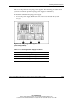
CAUTION: Hot-plug power supplies for this server are keyed to ensure that only
600-W hot-plug power supplies can be installed in the server. The handles on 600-W
power supplies are carbon (black) to distinguish them from 450-W power supplies,
which are opal (white).
CAUTION: Always populate power supply bays with either a power supply or blank.
Proper airflow can only be maintained when the bays are populated. Unpopulated
power supply bays can lead to improper cooling and thermal damage.
IMPORTANT: For rack-model servers, do not install the power supplies until after the server
is installed in the rack. Leaving the power supplies out reduces the weight of the server for
purposes of rack installation.