
HP ProLiant ML570 Generation 2 Server Setup and Installation Guide



Installing Hardware Options
HP ProLiant ML570 Generation 2 Server Setup and Installation Guide 3-47
HP CONFIDENTIAL
Writer: Wendy Wing File Name: d-ch3 Installing Hardware Options.doc
Codename: Time Bandit Part Number: 223960-002 Last Saved On: 8/22/02 10:51 AM
5. Close the access panel.
6. Install the server. Refer to Chapter 5, “Installing the Rack Server” or Chapter 6,
“Installing the Tower Server.”
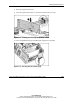
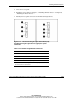
7. Identify the rear panel connectors of the Remote Insight board.
Figure 3-41: The Remote Insight Lights-Out Edition (left)
and Remote Insight Lights-Out Pro (right) rear panel
connectors
Table 3-10: Remote Insight Board Connectors
Item Connector
1 AC adapter connector *
2 Video connector
3 Keyboard/mouse connector *
4 NIC Connector (RJ-45)
* If you use internal cabling as shown in step 4, you do not
need to use these connectors.