
HP ProLiant ML570 Generation 2 Server Setup and Installation Guide

Installing Hardware Options
HP ProLiant ML570 Generation 2 Server Setup and Installation Guide 3-35
HP CONFIDENTIAL
Writer: Wendy Wing File Name: d-ch3 Installing Hardware Options.doc
Codename: Time Bandit Part Number: 223960-002 Last Saved On: 8/22/02 10:51 AM
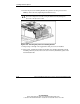
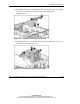
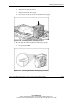
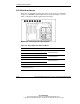
b. Align the fan with the fan bay.
c. Slide the fan down into its bay.
d. Press down on the top of the fan until the lock engages.
Figure 3-30: Installing CPU or I/O hot-plug fans
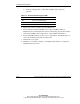
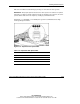
3. Be sure that the newly installed fan functions properly:
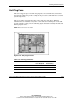
a. Locate the fan LED.
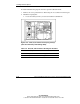
Figure 3-31: Locating the CPU or I/O hot-plug fan LED