
HP ProLiant ML570 Generation 2 Server Setup and Installation Guide

Installing Hardware Options
3-34 HP ProLiant ML570 Generation 2 Server Setup and Installation Guide
HP CONFIDENTIAL
Writer: Wendy Wing File Name: d-ch3 Installing Hardware Options.doc
Codename: Time Bandit Part Number: 223960-002 Last Saved On: 8/22/02 10:51 AM
To install redundant hot-plug fans from the optional redundant fan kit:
1. Remove the access panel. Refer to “Removing the Access Panel” in this chapter.
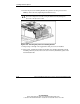
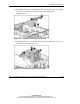
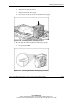
2. Install the hot-plug fans:
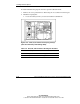
a. Locate the fan bays where you want to install the redundant fan.
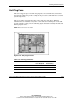
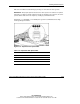
Figure 3-29: CPU, I/O, and drive fans hot-plug fan bays
(view from the front panel looking down)
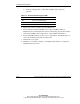
Table 3-6: CPU, I/O, and Fan drives Hot-Plug Fan locations
Item Description
1 Optional redundant CPU hot-plug fan
2 Optional redundant I/O hot-plug fan