
HP ProLiant ML570 Generation 2 Server Setup and Installation Guide

Installing Hardware Options
HP ProLiant ML570 Generation 2 Server Setup and Installation Guide 3-33
HP CONFIDENTIAL
Writer: Wendy Wing File Name: d-ch3 Installing Hardware Options.doc
Codename: Time Bandit Part Number: 223960-002 Last Saved On: 8/22/02 10:51 AM
Hot-Plug Fans
This server supports up to two CPU hot-plug fans, one rear baffle fan, and two I/O
hot-plug fans. CPU fans provide cooling for the processors, while I/O fans cool other
system components.
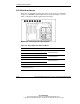
The server airflow is divided into three zones: CPU, I/O, and drives. When the
redundant fans are installed, if any fan in a zone fails, the remaining fan or fans will
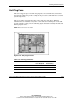
provide adequate cooling. Use the following figure and table to identify the CPU and
I/O hot-plug fan zones.
NOTE: Drive fan zone is not shown.
Figure 3-28: Hot-plug fan zones
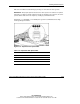
Table 3-5: Hot-Plug Fan Zones
Item Fan Zone Number of
Fans Required
Total for
Redundancy
1 I/O 1 2
2 CPU 2 3
Not shown Drives