
HP ProLiant ML570 Generation 2 Server Setup and Installation Guide

Installing Hardware Options
3-32 HP ProLiant ML570 Generation 2 Server Setup and Installation Guide
HP CONFIDENTIAL
Writer: Wendy Wing File Name: d-ch3 Installing Hardware Options.doc
Codename: Time Bandit Part Number: 223960-002 Last Saved On: 8/22/02 10:51 AM
19. Reinstall the access panel.
20. Install the server. Refer to Chapter 5, “Installing the Rack Server” or Chapter 6,
Installing the Tower Server.”
21. Power up the server. Refer to Chapter 5, “Installing the Rack Server” or
Chapter 6, “Installing the Tower Server.”
NOTE: The ROM sets the processing frequency during the Power On Self Test (POST).
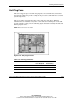
22. Be sure that the internal health LED on the front of the system is illuminated
green, indicating that the system is functioning properly. For detailed information
on LEDs, refer to Appendix C, “System LEDs and Switches.”
23. If the LED indicates an error, refer to Appendix D, “Troubleshooting,” or refer to
the troubleshooting guide for instructions.