
HP ProLiant ML570 Generation 2 Server Setup and Installation Guide




Installing Hardware Options
3-24 HP ProLiant ML570 Generation 2 Server Setup and Installation Guide
HP CONFIDENTIAL
Writer: Wendy Wing File Name: d-ch3 Installing Hardware Options.doc
Codename: Time Bandit Part Number: 223960-002 Last Saved On: 8/22/02 10:51 AM
NOTE: When upgrading the processors to a higher speed, you do not need to set any
switches to set processor frequency. The system ROM automatically sets the processor
frequency during POST.
To replace existing processors with new processors of higher frequency:
1. For tower-model servers only, open the front bezel door. Refer to “Opening the
Front Bezel Door” in this chapter.
2. Power down the server. Refer to “Powering Down the Server” in this chapter.
3. For rack-model servers only, extend the server from the rack. Refer to
“Extending the Server from the Rack” in Chapter 6, “Installing the Rack Server.”
4. Remove the access panel. Refer to “Removing the Access Panel” in this chapter.
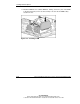
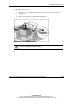
5. Remove the rear processor air baffle:
a. Loosen the two thumbscrews that secure the air baffle to the system tray (1).
b. Lift the air baffle up out of the server (2).
Figure 3-18: Removing the rear processor air baffle