
HP ProLiant ML570 Generation 2 Server Setup and Installation Guide

Installing Hardware Options
HP ProLiant ML570 Generation 2 Server Setup and Installation Guide 3-17
HP CONFIDENTIAL
Writer: Wendy Wing File Name: d-ch3 Installing Hardware Options.doc
Codename: Time Bandit Part Number: 223960-002 Last Saved On: 8/22/02 10:51 AM
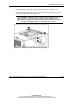
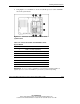
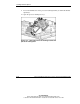
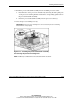
8. Using Figure 3-11 and Table 3-4, locate an available processor socket and PPM
slot on the system board.
Figure 3-11: Processor sockets and PPM slots on the
system board
Table 3-4: Processor Sockets and PPM Slots on the
System Board
Item Slot or Socket
1 PPM 1 slot (ships populated)
2 Processor 1 socket (ships populated)
3 Processor 2 socket
4 PPM 2 slot
5 PPM 3 slot
6 Processor 3 socket
7 Processor 4 socket
8 PPM 4 slot
IMPORTANT: Processor socket 1 and PPM slot 1 must always be populated. Failure to
populate processor socket 1 and PPM slot 1 prevents the system from operating.