
HP ProLiant ML570 Generation 2 Server Setup and Installation Guide



Installing Hardware Options
HP ProLiant ML570 Generation 2 Server Setup and Installation Guide 3-9
HP CONFIDENTIAL
Writer: Wendy Wing File Name: d-ch3 Installing Hardware Options.doc
Codename: Time Bandit Part Number: 223960-002 Last Saved On: 8/22/02 10:51 AM
Locating and Removing the Torx T-15 Tool
Many hardware procedures in the server are tool less, but a few require the removal
of Torx T-15 screws that have been installed for shipping or security reasons. A Torx
T-15 tool ships with the server for the removal of these screws.
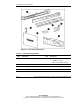
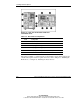
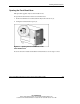
To remove the Torx T-15 tool:
1. Locate the Torx T-15 tool on the back of the server, just below the system tray
handle.
2. Slide the tool out of the retaining clips.
Figure 3-4: Locating and removing the Torx T-15 tool