
HP ProLiant ML570 Generation 2 Server Setup and Installation Guide



Installing Hardware Options
3-8 HP ProLiant ML570 Generation 2 Server Setup and Installation Guide
HP CONFIDENTIAL
Writer: Wendy Wing File Name: d-ch3 Installing Hardware Options.doc
Codename: Time Bandit Part Number: 223960-002 Last Saved On: 8/22/02 10:51 AM
Preparing for an Installation
Most internal installation procedures involve either the memory or system board.
Installing components onto these boards may require the following common
preparatory tasks:
• Powering down the server
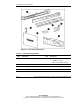
• Locating and removing the Torx T-15 tool
• Removing the access panel
• Opening the hot-plug door
Powering Down the Server
To power down the server:
1. Shut down the operating system as directed in the operating system instructions.
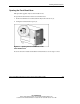
2. For tower-model servers only, open the front bezel door. Refer to “Opening the
Front Bezel Door” in this chapter.
3. If the server is on, set the Power On/Standby button to standby.
4. Be sure that the following events occur:
— The Power On/Standby button LED turns amber, indicating that the system
is in standby mode.
— All fans stop spinning.
5. Disconnect all AC power cords.
WARNING: The system power in the server does not completely shut off
from the front panel Power On/Standby button. Moving the button from On
to Standby leaves some portions of the hot-plug power supply and some
internal circuitry active. To shut off all power to the system, move the
button to Standby and disconnect all AC power cords from the server.