
HP ProLiant ML570 Generation 2 Server Setup and Installation Guide



Installing Hardware Options
3-6 HP ProLiant ML570 Generation 2 Server Setup and Installation Guide
HP CONFIDENTIAL
Writer: Wendy Wing File Name: d-ch3 Installing Hardware Options.doc
Codename: Time Bandit Part Number: 223960-002 Last Saved On: 8/22/02 10:51 AM
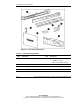
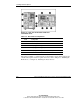
Figure 3-2: Rear view of the tower-model and
rack-model server
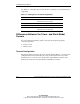
Table 3-3: Rear Chassis Components
Item Component
1 System tray handle
2 PCI-X expansion slots
3 Hot-plug power supply 1
4 Hot-plug power supply bay 2
5 Hot-plug power supply bay 3 (redundant)
6 Torx T-15 tool
The features in Table 3-3 pertain directly to the hardware options in this chapter. For
a detailed description of the rear panel connectors, refer to Chapter 5, “Installing the
Rack Server,” or Chapter 6, “Installing the Tower Server.”