
HP ProLiant ML570 Generation 2 Server Setup and Installation Guide



Installing Hardware Options
3-4 HP ProLiant ML570 Generation 2 Server Setup and Installation Guide
HP CONFIDENTIAL
Writer: Wendy Wing File Name: d-ch3 Installing Hardware Options.doc
Codename: Time Bandit Part Number: 223960-002 Last Saved On: 8/22/02 10:51 AM
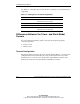
Use Table 3-1 to determine how to reach the most commonly accessed internal server
components.
Table 3-1: Gaining Access to Internal Components
Component Access Instruction
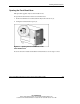
Expansion slots Open the front bezel door (tower model only)
and remove the access panel.
Hot-plug expansion slots Open the hot-plug door.
Memory Open the hot-plug door.
Processor sockets Open the front bezel door (tower model only)
and remove the access panel.
Differences Between the Tower- and Rack-Model
Servers
You can perform the following chassis conversions by using the appropriate
conversion option kit:
• Tower-to-rack
• Rack-to-tower
Chassis Configuration
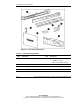
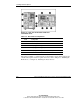
The primary difference between the tower and rack models (Figure 3-1) is the chassis
configuration. The tower model also has casters on the bottom of the server and a
front bezel door to cover the server chassis. This chapter illustrates only the rack
model of the server for most of the hardware installation procedures.