
HP ProLiant ML570 Generation 2 Server Setup and Installation Guide


Troubleshooting
D-8 HP ProLiant ML570 Generation 2 Server Setup and Installation Guide
HP CONFIDENTIAL
Writer: Wendy Wing File Name: m-appd Troubleshooting.doc
Codename: Time Bandit Part Number: 223960-002 Last Saved On: 8/22/02 11:24 AM
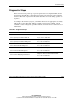
Table D-4: Is the External Health LED Green?
Answer Possible Reasons Possible Solutions
No, it is
amber
One power supply has failed;
therefore, power supply
redundancy is lost.
Be sure that each installed power supply is
securely connected to an AC power source.
Locate the amber power supply LED to
Identify the failed power supply.
Contact your HP authorized service provider
for replacement parts and service.
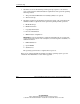
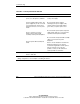
No, it is red All installed power supplies have
experienced a failure.
Remove all AC power from power supplies
and reconnect to clear the error condition.
Replace the power supply. Contact your HP
authorized service provider for replacement
parts and service.
Yes If the external health LED is green, refer to Table D-5.
Note: For LED locations and functions, refer to Appendix C, “System LEDs and Switches.” For
cabling configurations, refer to Chapter 7, “Cabling the Server.”
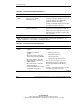
Table D-5: Is the Internal Health LED Green?
Answer Possible Reasons Possible Solutions
No, it is
amber
A processor is in pre-failure
condition.
A DIMM is in pre-failure
condition.
One memory bank is valid, but
another bank is missing a DIMM.
One memory bank is valid, but
another bank has mismatched
DIMMs installed.
One memory bank is valid, but
another bank has an
unsupported DIMM type installed.
A redundant fan has failed.
Use internal component failure LEDs to
identify:
• Missing components
• Degraded components
• Failed components
• Improperly installed components
For corrective procedures, refer to the
Maintenance and Service Guide on the
Documentation CD that ships with the
server.
Contact your HP authorized service provider
for replacement parts and service.
continued