
HP ProLiant ML570 Generation 2 Server Setup and Installation Guide


Troubleshooting
D-6 HP ProLiant ML570 Generation 2 Server Setup and Installation Guide
HP CONFIDENTIAL
Writer: Wendy Wing File Name: m-appd Troubleshooting.doc
Codename: Time Bandit Part Number: 223960-002 Last Saved On: 8/22/02 11:24 AM
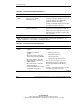
Table D-2: Is the System Power LED Off?
Answer Possible Reasons Possible Solutions
Yes, it is off The system is not connected to AC
power, or no AC power is available.
A power supply problem exists. The
power supply may not be connected
or inserted properly, it may have a
damaged connector, or it may have
failed.
There is a broken connection
between the front panel LED
assembly and the power backplane.
The front panel LED assembly has
failed.
Be sure that the power cord is connected
to the power supply.
Be sure that the power supply is
undamaged, the power supply is fully
seated, and the power supply LED is
green when you power up the server.
Be sure that the system power and power
supply signal cables are connected to the
system board and power backplane.
Be sure that the front panel LED assembly
cable is connected to the power
backplane.
Refer to “Power Problems” and “General
Hardware Problems” in the Servers
Troubleshooting Guide for further options.
If these solutions do not solve the
problem, contact your HP authorized
service provider for assistance.
No If the system power button LED is amber, press the Power On/Standby button.
Refer to Table D-3.
Note: For LED locations and functions, refer to Appendix C, “System LEDs and Switches.” For
cabling configurations, refer to Chapter 7, “Cabling the Server.”