
HP ProLiant ML570 Generation 2 Server Setup and Installation Guide
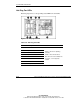
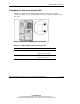
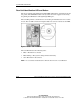
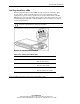
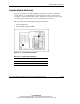

System LEDs and Switches
C-16 HP ProLiant ML570 Generation 2 Server Setup and Installation Guide
HP CONFIDENTIAL
Writer: Wendy Wing File Name: l-appc System LEDs and Switches.doc
Codename: Time Bandit Part Number: 223960-002 Last Saved On: 8/22/02 11:22 AM
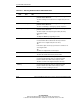
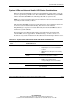
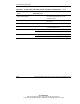
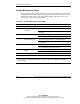
Table C-12: System LEDs and Internal Health LED Status Combinations continued
Internal System LED and
Color
Front Panel Internal
Health LED Color
State
DIMM failure, all slots in one
bank (flashing amber)
Red Configuration error: The indicated DIMMs
are not properly populated or are an
unsupported type.
DIMM failure, all slots (amber) Red No valid or usable memory is installed in
the system.
Memory board interlock (amber) Red No memory board is installed.
Thermal warning (amber) Red System has exceeded OS cautionary level
or critical hardware level.
Red A required fan has failed or is missing. Fan (amber)
Amber A redundant fan has failed.
Red A required power supply has failed. Power supply (off)
Amber A redundant power supply has failed.