
HP ProLiant ML570 Generation 2 Server Setup and Installation Guide


Cabling the Server
7-16 HP ProLiant ML570 Generation 2 Server Setup and Installation Guide
HP CONFIDENTIAL
Writer: Wendy Wing File Name: h-ch7 Cabling the Server
Codename: Time Bandit Part Number: 223960-002 Last Saved On: 9/5/02 3:07 PM
Rack Cabling Guidelines
After you have installed all internal options, replaced the server access panel, and
configured the server for your rack, you are ready to connect the power cord and
peripheral devices.
CAUTION: Always connect peripheral devices before connecting power to the
server. An improper cabling connection sequence can result in electrical damage to
peripheral devices.
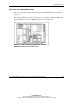
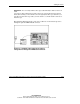
Rear panel connectors on the server include:
• Video (blue)
• Parallel (burgundy)
• Embedded NIC (RJ-45)
• Serial (teal)
• VHDCI SCSI
• Mouse (green)
• Keyboard (purple)
• USB (black)
For additional rack cabling guidelines and information, refer to the Rack Resources
CD provided with your rack.