
HP ProLiant ML570 Generation 2 Server Setup and Installation Guide


Installing the Tower Server
6-6 HP ProLiant ML570 Generation 2 Server Setup and Installation Guide
HP CONFIDENTIAL
Writer: Wendy Wing File Name: g-ch6 Installing the Tower Server.doc
Codename: Time Bandit Part Number: 223960-002 Last Saved On: 8/22/02 11:12 AM
To power up the server:
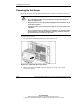
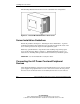
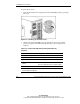
1. Open the front bezel door and press the Power On/Standby button to power up
the server.
Figure 6-3: Powering up the tower server
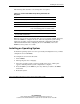
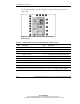
2. Observe the front panel LEDs to be sure that the server has a successful
power-on sequence. The following table describes a successful power-on
sequence.
Table 6-2: Front Panel LED Activity During the Power-On
Sequence
Item Description
Unit Identification (UID) Off
Internal health From off to green
External health From off to green
Embedded NIC connector
activity
From off to green if there is a link on the NIC
From off to flashing green for network activity
System power From amber to green
Note: For a detailed explanation of all system LEDs, refer to Appendix C,
“System LEDs and Switches.”