
HP ProLiant ML570 Generation 2 Server Setup and Installation Guide


Installing the Tower Server
6-4 HP ProLiant ML570 Generation 2 Server Setup and Installation Guide
HP CONFIDENTIAL
Writer: Wendy Wing File Name: g-ch6 Installing the Tower Server.doc
Codename: Time Bandit Part Number: 223960-002 Last Saved On: 8/22/02 11:12 AM
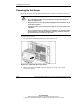
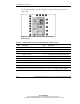
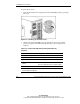
Use the following figure and table to identify connectors on the rear panel of the
tower server.
Figure 6-2: Rear panel connectors and components
(tower server)
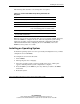
Table 6-1: Rear Panel Connectors and Components (Tower Server)
Item Description Item Description
1 Keyboard connector 10 Hot-plug power supply 1
2 Mouse connector 11 Hot-plug power supply 2
3 Serial connector A 12 Torx T-15 tool
4 Parallel connector 13 Unit Identification (UID) switch and LED
5 Embedded NIC connector (RJ-45) 14 USB connectors
6 Release latch 15 Video connector
7 VHDCI SCSI connector * 16 Serial connector B
8 PCI-X Hot Plug expansion slots 17 Hot-plug power supply 3 (redundant)
9 PCI-X non-hot plug expansion slots
* In the standard shipping configuration, the VHDCI SCSI connector is not connected. To connect
the VHDCI SCSI connector, refer to “External Devices” in Chapter 3, “Installing Hardware Options.”