
HP ProLiant ML570 Generation 2 Server Setup and Installation Guide


Installing the Tower Server
HP ProLiant ML570 Generation 2 Server Setup and Installation Guide 6-3
HP CONFIDENTIAL
Writer: Wendy Wing File Name: g-ch6 Installing the Tower Server.doc
Codename: Time Bandit Part Number: 223960-002 Last Saved On: 8/22/02 11:12 AM
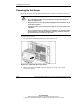
WARNING: To reduce the risk of electrical shock or fire, do not plug
telecommunications/telephone cables into the NIC connectors.
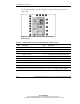
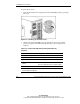
IMPORTANT: If the Remote Insight Lights-Out Edition is installed in the server, be sure that
you connect your video cable into the video connector on the rear of the Remote Insight
Lights-Out Edition expansion board. The standard video connector on the server rear panel is
not used when the Remote Insight Lights-Out Edition is installed. For more information, refer to
the documentation that ships with the Remote Insight Lights-Out Edition option kit.