
HP ProLiant ML570 Generation 2 Server Setup and Installation Guide

Installing the Rack Server
5-24 HP ProLiant ML570 Generation 2 Server Setup and Installation Guide
HP CONFIDENTIAL
Writer: Wendy Wing File Name: f-ch5 Installing the Rack Server.doc
Codename: Time Bandit Part Number: 223960-002 Last Saved On: 8/22/02 10:58 AM
CAUTION: Hot-plug power supplies for the server are keyed to ensure that only
600-W hot-plug power supplies can be installed in the server. The handles on 600-W
power supplies are color-coded carbon (black) to distinguish them from 450-W power
supplies, which are color-coded opal (white).
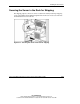
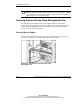
Securing Cables with the Cable Management Arm
The cable management arm that ships in the rack kit with the server includes
hook-and-loop straps that are used to secure multiple server and peripheral cables to
the arm. Using the guidelines in this section enhances cable management among
several servers in a rack configuration.
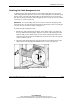
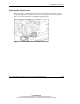
Securing Server Cables
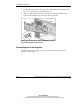
Use the cable management straps attached to the cable management arm to collect
and secure external power, network, and peripheral device cables.
Figure 5-19: Server cables secured to the cable
management arm