
HP ProLiant ML570 Generation 2 Server Setup and Installation Guide

Installing the Rack Server
5-22 HP ProLiant ML570 Generation 2 Server Setup and Installation Guide
HP CONFIDENTIAL
Writer: Wendy Wing File Name: f-ch5 Installing the Rack Server.doc
Codename: Time Bandit Part Number: 223960-002 Last Saved On: 8/22/02 10:58 AM
Connecting the Power Cord and Peripheral Devices
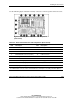
After the server has been installed in the rack, connect the power cord and peripheral
devices to the connectors located on the rear panel of the server. Icons on the back of
the server identify the function of each connector.
WARNING: To reduce the risk of electrical shock or fire, do not plug
telecommunications/telephone cables into the NIC connectors.
IMPORTANT: If the Remote Insight Lights-Out Edition is installed in the server, be sure that
you connect your video cable into the video connector on the rear of the Remote Insight
Lights-Out Edition expansion board. The standard video connector on the server rear panel is
not used when the Remote Insight Lights-Out Edition is installed. For more information, refer to
the documentation that ships with the Remote Insight Lights-Out Edition option kit.