
HP ProLiant ML570 Generation 2 Server Setup and Installation Guide

Installing the Rack Server
HP ProLiant ML570 Generation 2 Server Setup and Installation Guide 5-17
HP CONFIDENTIAL
Writer: Wendy Wing File Name: f-ch5 Installing the Rack Server.doc
Codename: Time Bandit Part Number: 223960-002 Last Saved On: 8/22/02 10:58 AM
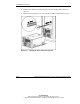
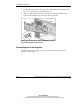
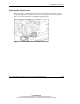
4. Use two people to lift the server by its four lift handles (1) and carefully align the
open ends of the server rails on the rear of the server with the extended bearing
race and inner slide rail of the rack rail assemblies (2).
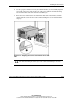
5. Insert the server rails into the extended inner slide rails on both sides, and then
slowly slide the server into the rack. Continue sliding the server forward until it
stops (3).
Figure 5-12: Aligning the server rails with the inner slide
rails
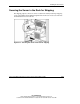
CAUTION: Keep the server parallel to the floor when sliding the server rails into the
inner slide rails. Tilting the server up or down could result in damage to the rails.