
HP ProLiant ML570 Generation 2 Server Setup and Installation Guide


Installing the Rack Server
HP ProLiant ML570 Generation 2 Server Setup and Installation Guide 5-13
HP CONFIDENTIAL
Writer: Wendy Wing File Name: f-ch5 Installing the Rack Server.doc
Codename: Time Bandit Part Number: 223960-002 Last Saved On: 8/22/02 10:58 AM
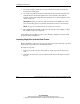
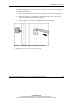
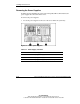
2. If present, remove the Torx T-15 screw from the power supply handle. The
Torx T-15 tool is clipped to the rear panel of the server.
Figure 5-8: Removing the shipping screw
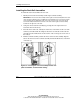
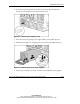
3. Press the latch on the primary power supply handle (1) and pull it down (2).
4. Pull the power supply out completely and set it aside for reinstallation later (3).
Figure 5-9: Removing the server power supplies
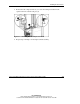
5. Repeat steps 2 through 4 to release and remove any additional power supplies.