
HP ProLiant ML570 Generation 2 Server Setup and Installation Guide


Installing the Rack Server
5-12 HP ProLiant ML570 Generation 2 Server Setup and Installation Guide
HP CONFIDENTIAL
Writer: Wendy Wing File Name: f-ch5 Installing the Rack Server.doc
Codename: Time Bandit Part Number: 223960-002 Last Saved On: 8/22/02 10:58 AM
Removing the Power Supplies
To make moving and lifting the server more manageable, HP recommends that all
power supplies be removed from the server.
To remove the power supplies:
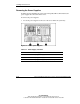
1. Locate the power supplies on the rear of the server under the system tray.
Figure 5-7: Server power supplies
Table 5-1: Power Supply Locations
Item Power Supply
1 Hot-plug power supply 1
2 Hot-plug power supply 2
3 Hot-plug power supply bay 3 (redundant)