
HP ProLiant ML570 Generation 2 Server Setup and Installation Guide

PCI-X Technology
HP ProLiant ML570 Generation 2 Server Setup and Installation Guide 4-25
HP CONFIDENTIAL
Writer: Wendy Wing File Name: e-ch4 PCI-X Technology.doc
Codename: Time Bandit Part Number: 223960-002 Last Saved On: 8/22/02 10:57 AM
• Hot removal of expansion boards
An expansion board can be manually shut down and permanently removed,
regardless of whether it is working or has failed. Performing a manual removal
also disables the device driver.
• Hot replacement of expansion boards
A failed expansion board can be replaced with an identical expansion board. This
action applies power to and configures the slot.
• Hot addition of expansion boards
An expansion board can be added into an empty slot.
Viewing Slot Detail Information
To view slot detail information:
1. From the main menu, highlight the slot and expansion board information to be
viewed.
2. Press the Enter key.
3. Select Slot Detail Information from the Slot Options menu.
Removing an Expansion Board
To remove an expansion board:
1. From the main menu, highlight the slot and expansion board to be removed.
2. Press the Enter key to go to the Slot Options menu.
3. Use the arrow keys to highlight Remove Expansion Board and press the Enter
key. NCMCON then processes the remove request.
4. Be sure that the slot has a status of POWERED down and the green LED is no
longer illuminated.
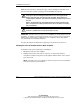
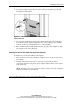
5. Open the expansion slot latch.
6. Remove the expansion board from the slot. NCMCON updates the status of the
slot.