
HP ProLiant ML570 Generation 2 Server Setup and Installation Guide



PCI-X Technology
4-20 HP ProLiant ML570 Generation 2 Server Setup and Installation Guide
HP CONFIDENTIAL
Writer: Wendy Wing File Name: e-ch4 PCI-X Technology.doc
Codename: Time Bandit Part Number: 223960-002 Last Saved On: 8/22/02 10:57 AM
Hot Removing an Expansion Board
The server includes a PCI slot divider and ejector to ensure slot safety and to
facilitate expansion board removal. To remove an expansion board from a PCI-X Hot
Plug slot:
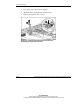
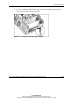
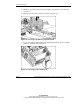
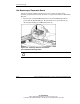
1. Press the port-colored PCI Hot Plug button or use the PCI Hot Plug Utility to
power down the PCI Hot Plug slot. Be sure that the slot is powered down by
observing the flashing green LED until it turns off.
Figure 4-10: Powering down the slot with the
port-colored PCI Hot Plug button
CAUTION: Be sure that the slot LED is off before removing the expansion board.