
HP ProLiant ML570 Generation 2 Server Setup and Installation Guide


PCI-X Technology
4-12 HP ProLiant ML570 Generation 2 Server Setup and Installation Guide
HP CONFIDENTIAL
Writer: Wendy Wing File Name: e-ch4 PCI-X Technology.doc
Codename: Time Bandit Part Number: 223960-002 Last Saved On: 8/22/02 10:57 AM
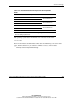
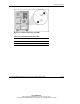
Use the following table to identify PCI-X Hot Plug slot activity status according to
LED description.
Table 4-6: PCI-X Expansion Slot LEDs
LED State OK to Open Slot Status
Power
Fault
On
Off
No Power is currently applied to the slot. Do NOT open
the expansion slot latch. The slot is functioning
normally.
Power
Fault
On
On
No Power is currently applied to this slot, but the slot
needs ATTENTION for a possible problem with the
slot, expansion board, or driver. Do NOT open the
expansion slot latch.
Power
Fault
Flashing
On or Off
No The power slot is being turned off or on, which may
take several minutes. Do NOT open the expansion
slot latch. Press the PCI Hot Plug button to cancel the
operation.
Power
Fault
Off
On
Yes Power to this slot is turned off, but this slot needs
ATTENTION. There may be a problem with the slot,
expansion board, or driver.
Power
Fault
Off
Off
Yes The power to the slot is off. An expansion board may
be installed in this slot.
Note: If the any of the LEDs indicates an error, refer to Appendix D, “Troubleshooting,” for more
information.