
HP ProLiant ML570 Generation 2 Server Setup and Installation Guide


PCI-X Technology
HP ProLiant ML570 Generation 2 Server Setup and Installation Guide 4-5
HP CONFIDENTIAL
Writer: Wendy Wing File Name: e-ch4 PCI-X Technology.doc
Codename: Time Bandit Part Number: 223960-002 Last Saved On: 8/22/02 10:57 AM
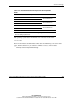
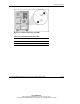
Table 4-2: Recommended PCI-X Expansion Slot Population
Order
Slot Number Population Order
1 1
2 5
Shared PCI-X bus
3 2
4 6
Shared PCI-X bus
5 3
6 7
Shared PCI-X bus
7* 4 PCI-X bus
* Slot 7 is recommended for the Remote Insight Lights-Out Edition due to
internal cabling requirements.
The operating system detects the PCI devices in the slots in this order:
1-2-3-4-5-6-7
For more information about PCI bus architecture and numbering, refer to the white
paper, PCI Bus Numbering in a Windows NT Environment, on the website:
www.hp.com/servers/proliant/manage