
HP ProLiant ML570 Generation 2 Server Setup and Installation Guide



Installing Hardware Options
HP ProLiant ML570 Generation 2 Server Setup and Installation Guide 3-77
HP CONFIDENTIAL
Writer: Wendy Wing File Name: d-ch3 Installing Hardware Options.doc
Codename: Time Bandit Part Number: 223960-002 Last Saved On: 8/22/02 10:51 AM
Connecting an External Device to an Expansion Board
To connect an external device to an expansion board:
1. Be sure that the external storage device can connect to the external connectors of
the expansion board.
2. Identify the expansion slot into which you intend to install the expansion board.
For more information on PCI-X technology and expansion slots, refer to
Chapter 4, “PCI-X Technology.”
3. Install the expansion board according to the procedures in this guide.
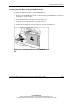
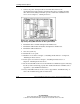
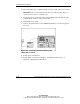
4. Connect the external device to the expansion board at the rear of the server.
Figure 3-67: Connecting an external storage device to
an expansion board
5. Power up the external device.
6. Power up the server. Refer to Chapter 5, “Installing the Rack Server” or
Chapter 6, “Installing the Tower Server.”