
HP ProLiant ML570 Generation 2 Server Setup and Installation Guide



Installing Hardware Options
3-76 HP ProLiant ML570 Generation 2 Server Setup and Installation Guide
HP CONFIDENTIAL
Writer: Wendy Wing File Name: d-ch3 Installing Hardware Options.doc
Codename: Time Bandit Part Number: 223960-002 Last Saved On: 8/22/02 10:51 AM
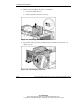
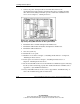
4. Disconnect drive cage A or B from SCSI connector A or B on the system board.
IMPORTANT: Once you have disconnected a drive cage cable, you must cable it to a
controller board to retain use of that drive cage.
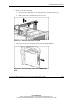
5. Locate the loose end of the internal-to-external SCSI cable and connect it to the
available SCSI connector on the system board.
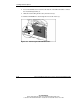
6. Reinstall the access panel.
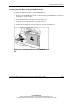
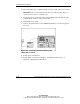
7. Connect the external device to the VHDCI SCSI connector on the rear panel of
the server.
Figure 3-66: Connecting an external device to the
VHDCI SCSI connector
8. Power up the external device.
9. Power up the server. Refer to Chapter 5, “Installing the Rack Server” or
Chapter 6, “Installing the Tower Server.”