
HP ProLiant ML570 Generation 2 Server Setup and Installation Guide



Installing Hardware Options
HP ProLiant ML570 Generation 2 Server Setup and Installation Guide 3-71
HP CONFIDENTIAL
Writer: Wendy Wing File Name: d-ch3 Installing Hardware Options.doc
Codename: Time Bandit Part Number: 223960-002 Last Saved On: 8/22/02 10:51 AM
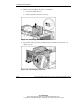
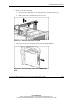
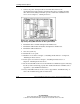
6. Remove the drive air baffle:
a. Loosen the two thumbscrews securing the drive air baffle in place (1).
b. Remove the drive air baffle from the server (2).
Figure 3-61: Removing the drive air baffle
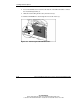
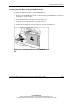
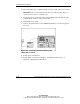
7. Disconnect the power and signal cables from the CD-ROM drive.
Figure 3-62: Disconnecting cables from the CD-ROM
drive