
HP ProLiant ML570 Generation 2 Server Setup and Installation Guide



Installing Hardware Options
3-70 HP ProLiant ML570 Generation 2 Server Setup and Installation Guide
HP CONFIDENTIAL
Writer: Wendy Wing File Name: d-ch3 Installing Hardware Options.doc
Codename: Time Bandit Part Number: 223960-002 Last Saved On: 8/22/02 10:51 AM
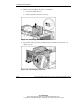
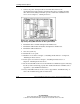
4. Remove both fan baskets. To remove a fan basket:
a. Loosen the thumbscrew (1).
b. Lift the fan basket out of the server (2).
Figure 3-59: Removing a fan basket
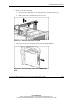
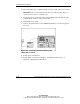
5. Press down on the system tray locking latch (1) and slide the system tray out
until it stops (2).
Figure 3-60: Extending the system tray