
HP ProLiant ML570 Generation 2 Server Memory Installation Guide


Memory
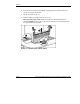
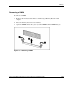
4. Press the release latches inward firmly, disengaging the board from the server
(2). Do not squeeze the latches.
5. Lift the ejector levers up (3).
6. Pull the memory board up out of the server (4).
Hot-replacement procedure: While the memory board with the failed or
degraded DIMM is being replaced, the system continues to read and write from
the operational memory board.
Figure 1-4: Removing the memory board
1-26 HP ProLiant ML570 Generation 2 Server Memory Installation Guide
HP CONFIDENTIAL
Writer: Jennifer Hayward File Name: b-ch1 Memory.doc
Codename: Seabiscuit Part Number: 279987-003 Last Saved On: 5/8/03 8:58 AM