
HP ProLiant ML570 Generation 2 Server Memory Installation Guide



Memory
Memory Board LEDs
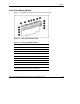
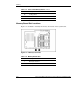
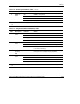
Use Figure 1-3 and tables 1-5 through 1-9 to identify LEDs and icons on the memory
board.
Figure 1-3: Memory board LEDs and icons
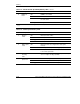
Table 1-5: Advanced ECC (Standard) Memory LEDs
Item Description Indicator Status
Off Memory board is offline.
Green Memory board is online.
Flashing green Memory board is busy.
1 Memory
status
Amber Memory error has occurred on this memory board.
4 “Ready to Hot
Plug” LED
Off Do not remove memory board—advanced ECC
memory does not support hot-removal of boards.
continued
HP ProLiant ML570 Generation 2 Server Memory Installation Guide 1-9
HP CONFIDENTIAL
Writer: Jennifer Hayward File Name: b-ch1 Memory.doc
Codename: Seabiscuit Part Number: 279987-003 Last Saved On: 5/8/03 8:58 AM