
HP ProLiant ML570 Generation 2 Server Memory Installation Guide



Memory
Quick Start LED Information
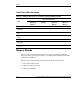
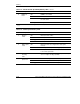
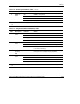
Table 1-2: Memory LED States on a Properly Configured Memory Board
Memory Configuration
LED
Advanced ECC
(Standard)
Memory
Online Spare
Memory
Single-Board
Mirrored
Memory
Hot-Plug
Mirrored
Memory
Memory status Green Green Green Green
DIMM 1-8, if
populated
Green Green Green Green
“Online Spare”
text *
Off Green Off Off
Online spare
status
Off Green Off Off
Mirroring status Off Off Green Green
“Ready to Hot
Plug” LED
Off Off Off Green
* If two memory boards are installed, the online spare text is only illuminated for the memory board
in slot 1.
Memory Boards
The server ships standard with one memory board. You can install an additional
memory board to expand system memory or to enable dual-board memory mirroring
and hot-plug capabilities.
This section provides the following information about the memory boards:
•
•
•
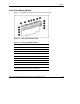
Parts of the memory board
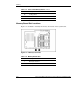
Memory board slot locations
Memory board LEDs
1-6 HP ProLiant ML570 Generation 2 Server Memory Installation Guide
HP CONFIDENTIAL
Writer: Jennifer Hayward File Name: b-ch1 Memory.doc
Codename: Seabiscuit Part Number: 279987-003 Last Saved On: 5/8/03 8:58 AM