
HP ProLiant ML570 Generation 2 Server Memory Installation Guide



Memory
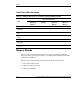
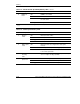
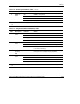
Use Table 1-1 as a quick reference for DIMM installation guidelines specific to your
desired memory configuration.
Table 1-1: Quick Start DIMM Installation Guidelines
Advanced ECC
(Standard) Memory
Online Spare Memory Single-Board
Mirrored Memory
Hot-Plug Mirrored
Memory
One or two memory
boards can be
installed.
One or two memory
boards can be
installed.
Install only one
memory board.
Two memory boards
are required.
A memory board
may be installed in
either slot.
Memory board slot 1
must be populated.
Memory board slot 1
must be populated.
Both memory board
slots must be
populated.
Hot-add or hot-mirror
procedures can be
performed only if
memory board slot 1
is populated.*
This configuration has
no hot-plug
capabilities.
This configuration has
no hot-plug
capabilities.
“Ready to Hot Plug”
LED indicates when
memory board can be
hot-plugged.
DIMMs in the online
spare bank must be of
equal or greater
capacity than DIMMs in
each remaining bank.
DIMMs in the mirrored
banks must be
configured identically
to the banks they are
mirroring.
Both memory boards
must be configured
identically.
Bank D on memory
board 1 must always
be populated.
Banks A and C must
always be populated.
Bank D of memory
board 1** is the online
spare bank, even if two
boards are installed.
Bank C mirrors
bank A.
Bank D mirrors
bank B.
* Minimum ROM and system management driver versions required for hot-add functionality. For
more information, refer to the HP ProLiant DL580 Generation 2 and HP ProLiant ML570 Generation
2 Server Hot-Add Memory document, located on the server documentation CD.
** Memory board slot 1 is the memory board slot closest to the PCI-X slots.
1-4 HP ProLiant ML570 Generation 2 Server Memory Installation Guide
HP CONFIDENTIAL
Writer: Jennifer Hayward File Name: b-ch1 Memory.doc
Codename: Seabiscuit Part Number: 279987-003 Last Saved On: 5/8/03 8:58 AM