
HP ProLiant ML500 Series Generation 2 Server Memory Installation Guide





Memory
1-30 HP ProLiant ML500 Series Generation 2 Server Memory Installation Guide
HP CONFIDENTIAL
Writer: Jim Yurick File Name: b-ch1 Memory.doc
Codename: Time Bandit Part Number: 279987-002 Last Saved On: 8/23/02 1:07 PM
3. Engage the locking switch (3).
Hot-replacement procedure: All LEDs now turn off except the memory status
LED, which flashes green while data are copied from one memory board to the
other. This process may take up to a minute to complete. When the copying
process is complete, the other LEDs re-illuminate as described in Table 1-10.
CAUTION: Do not remove the memory board while the memory status LED is
flashing. When the memory status LED is flashing, the memory board is
transferring data. Removing the memory board during data transfer may cause
system failure.
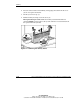
Figure 1-7: Installing the memory board
4. If the server is not currently configured for hot-plug mirrored memory, power up
the server. Refer to Chapter 6, “Installing the Rack Server” or Chapter 7,
“Installing the Tower Server,” in the setup and installation guide on the
Documentation CD.
Hot-plug procedure: If the server is configured for hot-plug mirrored memory,
skip to step 7.
5. Configure the memory. Refer to “Configuring the Memory” in this chapter.