
HP ProLiant ML500 Series Generation 2 Server Memory Installation Guide





Memory
HP ProLiant ML500 Series Generation 2 Server Memory Installation Guide 1-29
HP CONFIDENTIAL
Writer: Jim Yurick File Name: b-ch1 Memory.doc
Codename: Time Bandit Part Number: 279987-002 Last Saved On: 8/23/02 1:07 PM
Installing a Memory Board
To install a memory board:
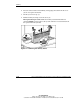
1. Align the memory board with the memory slot and memory board guide clips.
2. Slide the memory board into the server (1) and close the ejector levers to seat the
memory board firmly (2).
Hot-replacement procedure: Any LEDs that were amber when the board was
removed from the server now illuminate amber again.
IMPORTANT: The LEDs re-illuminate amber during this step to enable you to see which
DIMM failed. If you have already replaced the failed DIMM, disregard the amber LEDs.
The LEDs change back to green after the locking switch is engaged.