
HP ProLiant ML500 Series Generation 2 Server Memory Installation Guide





Memory
1-28 HP ProLiant ML500 Series Generation 2 Server Memory Installation Guide
HP CONFIDENTIAL
Writer: Jim Yurick File Name: b-ch1 Memory.doc
Codename: Time Bandit Part Number: 279987-002 Last Saved On: 8/23/02 1:07 PM
Installing a DIMM
To install a DIMM:
1. Remove the memory board. Refer to “Removing a Memory Board” in this
chapter.
2. Observe all DIMM installation requirements for your desired memory mode.
Refer to the “DIMM Installation Requirement” sections for each mode in this
chapter.
IMPORTANT: Follow all DIMM configuration requirements carefully. If the DIMMs are not
configured properly, you receive an error message during POST and the DIMM LEDs
flash amber.
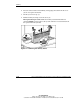
3. Align the keyed portion of the bottom edge of the DIMM with the tab in the
DIMM slot.
4. Press the DIMM firmly into the slot (1) and push the latches into place (2).
Figure 1-6: Installing and latching a DIMM
IMPORTANT: The bottom edge of the DIMM is designed so that it fits into the DIMM slot only
one way.