
HP ProLiant ML500 Series Generation 2 Server Memory Installation Guide





Memory
HP ProLiant ML500 Series Generation 2 Server Memory Installation Guide 1-27
HP CONFIDENTIAL
Writer: Jim Yurick File Name: b-ch1 Memory.doc
Codename: Time Bandit Part Number: 279987-002 Last Saved On: 8/23/02 1:07 PM
Removing a DIMM
To remove a DIMM:
1. Remove the memory board. Refer to “Removing a Memory Board” in this
chapter.
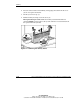
2. Place the memory board on a level surface.
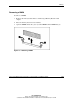
3. Open the DIMM slot latches (1) to eject the DIMM from the DIMM slot (2).
Figure 1-5: Removing a DIMM