
HP ProLiant ML500 Series Generation 2 Server Memory Installation Guide






Memory
1-12 HP ProLiant ML500 Series Generation 2 Server Memory Installation Guide
HP CONFIDENTIAL
Writer: Jim Yurick File Name: b-ch1 Memory.doc
Codename: Time Bandit Part Number: 279987-002 Last Saved On: 8/23/02 1:07 PM
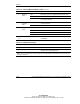
Table 1-8: Hot-Plug Mirrored Memory LEDs continued
Item Description Indicator Status
Off Memory board is not configured for mirrored memory.
Green Hot-plug mirrored memory is functioning properly.
3 Mirroring
status
Amber Memory error has occurred and system has failed over
to the mirrored board.
Off Do not remove memory board—memory board is not
ready for removal.
4 “Ready to
Hot Plug”
LED
Green Okay to remove memory board.
Off DIMM is not installed.
Green DIMM is installed.
Amber Memory error has occurred on this DIMM.
8 DIMM 1-8
status
Flashing amber Configuration error has occurred.
1-4,
7, 8
All LEDs Flashing amber CAUTION—memory board is in use; relock it
immediately.
Table 1-9: Memory Board Icons
Item Description Status
5 Lock Memory board is locked and cannot be removed.
6 Unlock Memory board is unlocked; do not unlock unless the
“Ready to Hot Plug” LED is green.
Note: The icon at which the memory board switch is pointed indicates whether the memory board is
locked or unlocked.