
HP ProLiant ML500 Series Generation 2 Server Memory Installation Guide





Memory
1-6 HP ProLiant ML500 Series Generation 2 Server Memory Installation Guide
HP CONFIDENTIAL
Writer: Jim Yurick File Name: b-ch1 Memory.doc
Codename: Time Bandit Part Number: 279987-002 Last Saved On: 8/23/02 1:07 PM
Quick Start LED Information
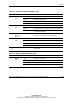
Table 1-2: Memory LED States on a Properly Configured Memory Board
Memory Configuration
LED
Advanced ECC
(Standard)
Memory
Online Spare
Memory
Single-Board
Mirrored
Memory
Hot-Plug
Mirrored
Memory
Memory status Green Green Green Green
DIMM 1-8, if
populated
Green Green Green Green
“Online Spare”
text *
Off Green Off Off
Online spare
status
Off Green Off Off
Mirroring status Off Off Green Green
“Ready to Hot
Plug” LED
Off Off Off Green
* If two memory boards are installed, the online spare text is only illuminated for the memory board
in slot 1.
Memory Boards
The ProLiant ML500 series Generation 2 servers ship standard with one memory
board. You can install an additional memory board to expand system memory or to
enable dual-board memory mirroring and hot-plug capabilities.
NOTE: Hot-plug mirrored memory mode is not available on ProLiant ML530 generation 2
servers.
This section provides the following information about the memory boards:
• Parts of the memory board
• Memory board slot locations