
Compaq ProLiant ML530 Setup and Installation Guide

Server Installation 3-27
Compaq Confidential – Need to Know Required
Writer: Tricia Acevedo Project: Compaq ProLiant ML530 Setup and Installation Guide Comments:
Part Number: 139006-002 File Name: d-ch3 Installation.doc Last Saved On: 6/15/00 9:02 AM
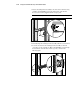
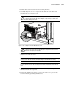
1. Pull the slide rails forward from the mounting brackets.
2. Carefully align the server’s component rails with the rack’s slide rails
and slide the server into the rack.
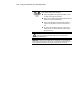
CAUTION: Be sure to keep the component parallel to the floor when sliding the
component rails into the slide rails. Tilting the component up or down could
result in damage to the rails.
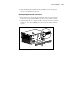
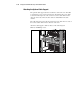
Figure 3-19. Loading the ProLiant ML530 rack server
WARNING: To reduce the risk of personal injury, be careful when pressing the
component rail release latches and sliding the component into the rack. The
slide rails could pinch your fingertips.
3. Depress the component rail release latch on either side of the server and
slide the server into the rack.
IMPORTANT: The first time you slide the component into the rack, you may have to apply
some pressure. After the first time, the ball bearings in the slide will move easily.
IMPORTANT: When servicing the server, fully extend the component until the latches
lock. To return the server to the rack, depress the latches and slide the server into the
rack.
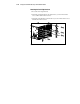
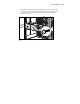
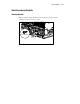
4. Secure the server face plate to the front of the rack by screwing the
thumbscrews into the cage nuts.
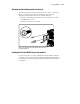
5. Tighten the thumbscrews before you close the rack door to prevent the
door from hitting protruding thumbscrews.