
Compaq ProLiant ML530 Setup and Installation Guide

Server Installation 3-25
Compaq Confidential – Need to Know Required
Writer: Tricia Acevedo Project: Compaq ProLiant ML530 Setup and Installation Guide Comments:
Part Number: 139006-002 File Name: d-ch3 Installation.doc Last Saved On: 6/15/00 9:02 AM
Attaching the Cable Management Arm Bracket
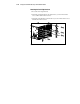
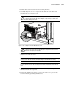
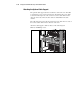
The cable management arm bracket fastens to the rear of the server. Refer to
Figure 3-18. The bracket provides an attachment point for the cable
management arm from the server to the rear frame of the rack.
1. Attach the cable management arm bracket to the back of the server with
two TORX (T-15) screws.
2. Attach the rack rail covers to the rack.
Figure 3-18. Attaching a cable management arm bracket to the
ProLiant ML530 server
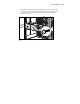
Installing the ProLiant ML530 Server into the Rack
Load and secure the server to the rack with the faceplate thumbscrews before
continuing to attach any more mounting bracket assemblies. Ensure that this
pair of brackets is perfectly aligned and installed and that the server fits before
you continue.