
Compaq ProLiant ML530 Setup and Installation Guide

3-18 Compaq ProLiant ML530 Setup and Installation Guide
Compaq Confidential – Need to Know Required
Writer: Tricia Acevedo Project: Compaq ProLiant ML530 Setup and Installation Guide Comments:
Part Number: 139006-002 File Name: d-ch3 Installation.doc Last Saved On: 6/15/00 9:02 AM
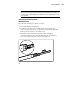
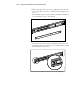
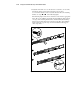
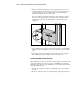
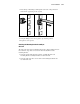
8. Adjust the inner slide to access the other two screw holes, one at a time,
through the slotted opening in the inner slide. Use two more
8-32 x 1/4-inch slotted screws to fasten the bracket rail to the mounting
bracket. See steps
and of the following figure.
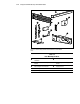
The following figure shows how to insert the screws into the appropriate
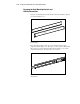
holes. The screws will line up with the 26-inch markings stamped along
one edge of the mounting bracket. These marks identify the mounting
holes for the 26-inch slides used in Compaq racks. The other markings
stamped along the opposite edge are for use with slides that support
other components.
1
2
3
26
26
Figure 3-11. Attaching the bracket rail to the mounting bracket