
Compaq ProLiant ML530 Setup and Installation Guide

Server Installation 3-7
Compaq Confidential – Need to Know Required
Writer: Tricia Acevedo Project: Compaq ProLiant ML530 Setup and Installation Guide Comments:
Part Number: 139006-002 File Name: d-ch3 Installation.doc Last Saved On: 6/15/00 9:02 AM
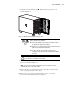
7. Swing the tower front bezel open . Lift the bezel up to remove it, as
shown in Figure 3-1.
1
Figure 3-1. Opening and removing the tower front bezel
62 kg
137 lb
WARNING: This server is very heavy. To reduce the risk of personal
injury or damage to the equipment:
■ Remove all pluggable power supplies and modules to reduce
the weight of the product before lifting it.
■ Observe local occupational health and safety requirements and
guidelines for manual material handling.
■ To reduce the risk of personal injury or damage to the
equipment, at least two people are needed to lift and stabilize
the server.
CAUTION: Be sure to lock the casters and have the access panel in place
before turning or reorienting the server position.
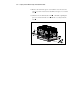
8. With the casters locked, turn the server onto its side with the access
panel on, as shown in Figure 3-2.
NOTE: Tools you may need while working with the server are listed in the section,
“Unpacking the Server,” later in this chapter.
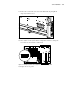
9. Remove the three screws from the top two casters (the casters nearest to
the access panel) and remove the casters.
10. Remove the access panel, as described in the section, “Accessing
Processors and the System Board,” in Chapter 2.