
Compaq ProLiant ML530 Setup and Installation Guide

3-4 Compaq ProLiant ML530 Setup and Installation Guide
Compaq Confidential – Need to Know Required
Writer: Tricia Acevedo Project: Compaq ProLiant ML530 Setup and Installation Guide Comments:
Part Number: 139006-002 File Name: d-ch3 Installation.doc Last Saved On: 6/15/00 9:02 AM
For proper operation and safety, this equipment must be properly grounded. In
the United States, install the equipment in accordance with NFPA 70-1993
(National Electric Code) Article 250, as well as any local and regional
building codes. In Canada, the equipment should be installed in accordance
with Canadian Standards Association, CSA C22.1, Canadian Electrical Code.
In all other countries the installation should follow any regional or national
electrical wiring codes such as the International Electrotechnical Commission
(IEC) 364 parts 1 through 7. All power distribution devices used in the
installation, including branch wiring, receptacles, and so on, should be Listed
or Certified ground-type devices.
WARNING: To reduce the risk of electrical shock due to high leakage currents,
a reliable grounded (earthed) connection is essential before connecting the unit
to an AC supply.
When using power strips for electrical distribution, make sure that ground
integrity is maintained for each connection made. Plug each component into a
reliably grounded outlet.
Temperature Requirements
To ensure continued safe and reliable operation of the equipment, install the
system in a well-ventilated, climate-controlled environment.
The Compaq Maximum Recommended Ambient Operating Temperature
(TMRA) for most server products is 35°C (95°F). The temperature in the room
where the rack is located should not exceed 35°C
(95°F).
The operating temperature inside the rack will always be higher than the room
temperature, and is dependent on the configuration of equipment in your rack.
Check the TMRA for each piece of equipment before installation. The
maximum internal rack temperature for your configuration should not exceed
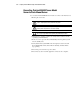
the values shown in the following table.
Table 3-1
Rack Internal Temperature Maximums
Equipment Included Maximum Internal Rack Temperature
Rack-mountable ProLiant servers 47°C/122°F
Compaq rack-mountable options 40°C/104°F
Other manufacturers’ options See other manufacturers’ specifications