
Compaq ProLiant ML530 Setup and Installation Guide

2-42 Compaq ProLiant ML530 Setup and Installation Guide
Compaq Confidential – Need to Know Required
Writer: Tricia Acevedo Project: Compaq ProLiant ML530 Setup and Installation Guide Comments:
Part Number: 139006-002 File Name: c-ch2 Installing Hardware.doc Last Saved On: 6/13/00 12:29 PM
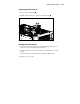
Accessing Hot-Plug Drive Fans
The ProLiant ML530 ships with three hot-plug drive fans standard. Pull the
system board tray back, as described in the section “Pulling the System Board
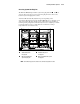
Tray” earlier in this chapter. Locate the hot-plug drive fan to be removed. See
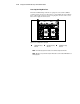
below for hot-plug drive fan location.
5 6 7
Figure 2-38. Locating drive hot-plug fan
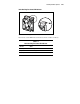
Standard hot-plug
drive fan
Standard hot-plug
drive fan
Standard hot-plug
drive fan
NOTE: Fan numbering represents actual service numbers assigned to the fans.
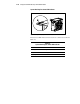
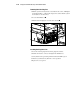
NOTE: With the access panel removed you will be able to see the status LED indicators of
all hot-plug fans.